
Events in C#
What Are Events In C#?1
Sezione intitolata “What Are Events In C#?1”In general terms, an event is something special that is going to happen. For example, Microsoft launches events for developers, to make them aware about the features of new or existing products. Microsoft notifies the developers about the event by email or other advertisement options. So in this case, Microsoft is a publisher who launches (raises) an event and notifies the developers about it and developers are the subscribers of the event and attend (handle) the event.
Events in C# follow a similar concept. An event has a publisher, subscriber, notification and a handler. Generally, UI controls use events extensively. For example, the button control in a Windows form has multiple events such as click, mouseover, etc. A custom class can also have an event to notify other subscriber classes about something that has happened or is going to happen. Let’s see how you can define an event and notify other classes that have event handlers.
An event is nothing but an encapsulated delegate. As we have learned in the previous section, a delegate is a reference type data type. You can declare the delegate as shown below:
An event can be used to provide notifications. You can subscribe to an event if you are interested in those notifications. You can also create your own events and raise them to provide notifications when something interesting happens. The .NET Framework offers built-in types that you can use to create events. By using delegates, lambda expressions, and anonymous methods, you can create and use events in a comfortable way.
A popular design pattern is application development is that of publish-subscribe: you can subscribe to an event and then you are notified when the publisher of the event raises a new event. This is used to establish loose coupling between components in an application. Delegate form the basis for the event system in C#
An event is a special kind of delegate that facilitates event-driven programming. Events are class members that cannot be called outside of the class regardless of its access specifier. So, for example, an event declared to be public would allow other classes the use of += and -= on the event, but firing the event (i.e. invoking the delegate) is only allowed in the class containing the event. Let’s see an example,
To declare an event, use the event keyword before declaring a variable of delegate type, as below:
public delegate void someEvent();
public event someEvent someEvent;
Thus, a delegate becomes an event using the event keyword.
First example
Sezione intitolata “First example”Ottieni il codice
namespace DemoEventsSimple{    //Define publisher class as Pub    public class Pub    {        //OnChange property containing all the        //list of subscribers callback methods        public event Action OnChange = delegate { };        public event Action<int> OnGetInput = delegate { };
        public void Raise()        {            //Invoke OnChange Action            OnChange();        }
        //un esempio che prende in input un parametro di tipo intero        public void RaiseWithInput(int p)        {            //Invoke OnGetInput Action            OnGetInput(p);        }    }
    internal class Program    {        static void Main(string[] args)        {            //Initialize pub class object            Pub p = new();
            //register for OnChange event - Subscriber 1            p.OnChange += () => Console.WriteLine("Subscriber 1!");            //register for OnChange event - Subscriber 2            p.OnChange += () => Console.WriteLine("Subscriber 2!");
            //raise the event            p.Raise();            //After this Raise() method is called            //all subscribers callback methods will get invoked
            //definiamo una variabile locale per dimostrare il concetto di closure            int x = 5;
            //subscriber all'evento OnGetInput: accetta in input un numero intero            p.OnGetInput += (q) => {                Console.WriteLine("OnGetInput fired");                q = x + 1;                Console.WriteLine($"parametro locale q = {q}");                Console.WriteLine($"riferimento esterno alla lambda expression x = {x}");            };
            Console.WriteLine("Invochiamo RaiseWithInput");            //qui passiamo un valore intero che corrisponderà alla q            p.RaiseWithInput(6);        }    }
}Also, you may have noticed special syntax of initializing the OnChange field to an empty delegate like this delegate . This ensures that our OnChange field will never be null. Hence, we can remove the null check before raising the event, if no other members of the class making it null.
When you run the above program, your code creates a new instance of Pub, subscribes to the event with two different methods and raises the event by calling p.Raise or p.RaiseWithInput. The Pub class is completely unaware of any subscribers. It just raises the event.
A more complex example
Sezione intitolata “A more complex example”Ottieni il codice
Nota: questo esempio è riportato a solo scopo informativo.
namespace DemoEvents{    public class Student    {        public int Id { get; set; }        public string? Name { get; set; }        public int Age { get; set; }    }
    public class Exam    {        public int Id { get; set; }        public string? Name { get; set; }        public int Score { get; set; }    }
    public class StudentTutor    {        public event Action<Student>? OnStudentReceived;        public event Func<Student, Exam, int>? OnStudentTakeExam;
        //metodo che solleva l'evento StudentReceived        public void StudentReceived(Student s)        {            OnStudentReceived?.Invoke(s);        }
        //metodo che solleva l'evento StudentTakeExam        public void StudentTakeExam(Student s, Exam e)        {            //callback function che restituisce il punteggio dell'esame            int? score = OnStudentTakeExam?.Invoke(s, e);            Console.WriteLine($"Lo studente {s.Name} ha sostenuto l'esame {e.Name} con un punteggio di {score}");        }    }
    internal class Program    {        static Random gen = new Random();        static void Main(string[] args)        {            //creazione di un oggetto Publisher            StudentTutor tutor = new StudentTutor();            //creazione di un oggetto Publisher            tutor.OnStudentReceived += (s) => Console.WriteLine($"Benvenuto {s.Name}");            tutor.OnStudentTakeExam += Tutor_OnStudentTakeExam;
            //creazione di studenti ed esami            Student marioRossi = new() { Id = 1, Name = "Mario Rossi", Age = 21 };            Exam fisica1 = new() { Id = 1, Name = "Fisica 1" };            Exam analisi1 = new() { Id = 2, Name = "Analisi 1" };
            //attivazione eventi            tutor.StudentReceived(marioRossi);            tutor.StudentTakeExam(marioRossi, fisica1);            tutor.StudentTakeExam(marioRossi, analisi1);            tutor.StudentTakeExam(marioRossi, fisica1);            tutor.StudentTakeExam(marioRossi, analisi1);            tutor.StudentTakeExam(marioRossi, fisica1);            tutor.StudentTakeExam(marioRossi, analisi1);        }
        //implementazione callback function corrispondenti agli eventi        private static int Tutor_OnStudentTakeExam(Student s, Exam e)        {            return gen.Next(15, 31);        }        private static void Tutor_OnStudentReceived(Student s)        {            Console.WriteLine($"Benvenuto {s.Name}");        }    }}
All the subscribers must provide a handler function, which is going to be called when a publisher raises an event.
The following image illustrates an event model:
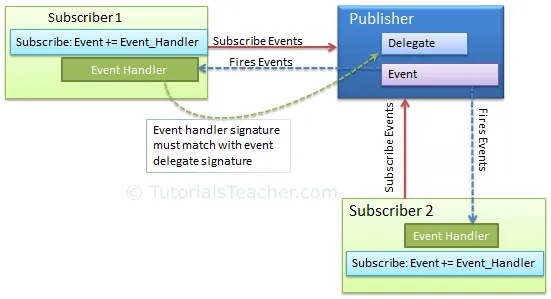
Event publisher-Subscriber
Points to Remember
Sezione intitolata “Points to Remember”- Use event keyword with delegate type to declare an event.
- Check event is null or not before raising an event.
- Subscribe to events using
+=operator. Unsubscribe it using-=operator. - Function that handles the event is called event handler. Event handler must have same signature as declared by event delegate.
- Events can have arguments which will be passed to handler function.
- Events can also be declared static, virtual, sealed and abstract.
- An Interface can include event as a member.
- Events will not be raised if there is no subscriber
- Event handlers are invoked synchronously if there are multiple subscribers
- .NET uses an EventHandler delegate and an EventArgs base class.